Network
Self-service tool to help internal users in generating valid trade lanes and to create logistic plans
ROLE
Product Designer
- Research & Analysis
- Product Strategy & Design
- Usability Testing
FARFETCH is the leading global platform for the luxury fashion industry. Today the FARFETCH Marketplace connects customers in over 190 countries and territories with items from more than 50 countries. Therefore it needs to have in place robust tools to efficiently create and manage logistic plans. I came in to help to develop these tools alongside a team of PMs and back/front-end engineers.
*Two tools were created within this project (Network & Planner) but I only cover the Network in this case study.
Problem
🚩 Lack of autonomy and tons of manual work
In the realm of logistics operations, the users are facing 2 prominent issues that need to be improved for their efficiency and effectiveness:
1️⃣ The primary challenge is that the internal team responsible for logistics doesn't have total autonomy to create trade lanes. This creates dependencies from other teams, leading to delays in putting the logistic plans live.
The lack of autonomy can cause significant frustration to the logistics team and other teams that are part of the process, resulting in a negative impact on the overall operation.
2️⃣ The second challenge is that it takes a lot of manual work when creating the logistic plans.
This manual work takes a considerable amount of time and increases the chances of human error. The consequences of these errors can be significant, such as delays in deliveries, incorrect shipments, and other issues that can negatively impact the entire logistics operation.
Business Goals
🖥️ Promote efficiency and autonomy for our internal teams by building a tool that gives the users the ability to generate valid trade lanes (routes), manage transportation lanes (links), courier services and logistic points (nodes).
⏳ Get logistic plans live quicker.
👷 Reduce the number of teams involved in this process so that it releases the workforce to other initiatives.
🧟♂️ Eliminate legacy tools used to make some of the logistic plans configurations.
Expected Outcomes
🖥️ An efficient tool that allows internal users to create trade lanes in single and bulk
With this tool the users will be able to create, autonomously, trade lanes without much effort and keep track of all the records generated in one place.
Research
A business case was presented to me with a few assumptions. Subsequently, I conducted research to validate (or not) these assumptions and uncover any other problems not identified in the business case.
🎨 Understand the AS-IS process and uncover pain points
The creation of logistic plans it's done by our internal teams so I was able to work closely with the users.
Me and the PM conducted several stakeholder interviews with the 3 teams involved in the process to understand how it was being done and to gather the pain-points of the users.
I also did shadowing to the users in their natural environment to better understand their mental models, habits and constrains.
The legacy tools were also analyzed as well as competitor's tools.
Research Analysis
✍️ Map the AS-IS process
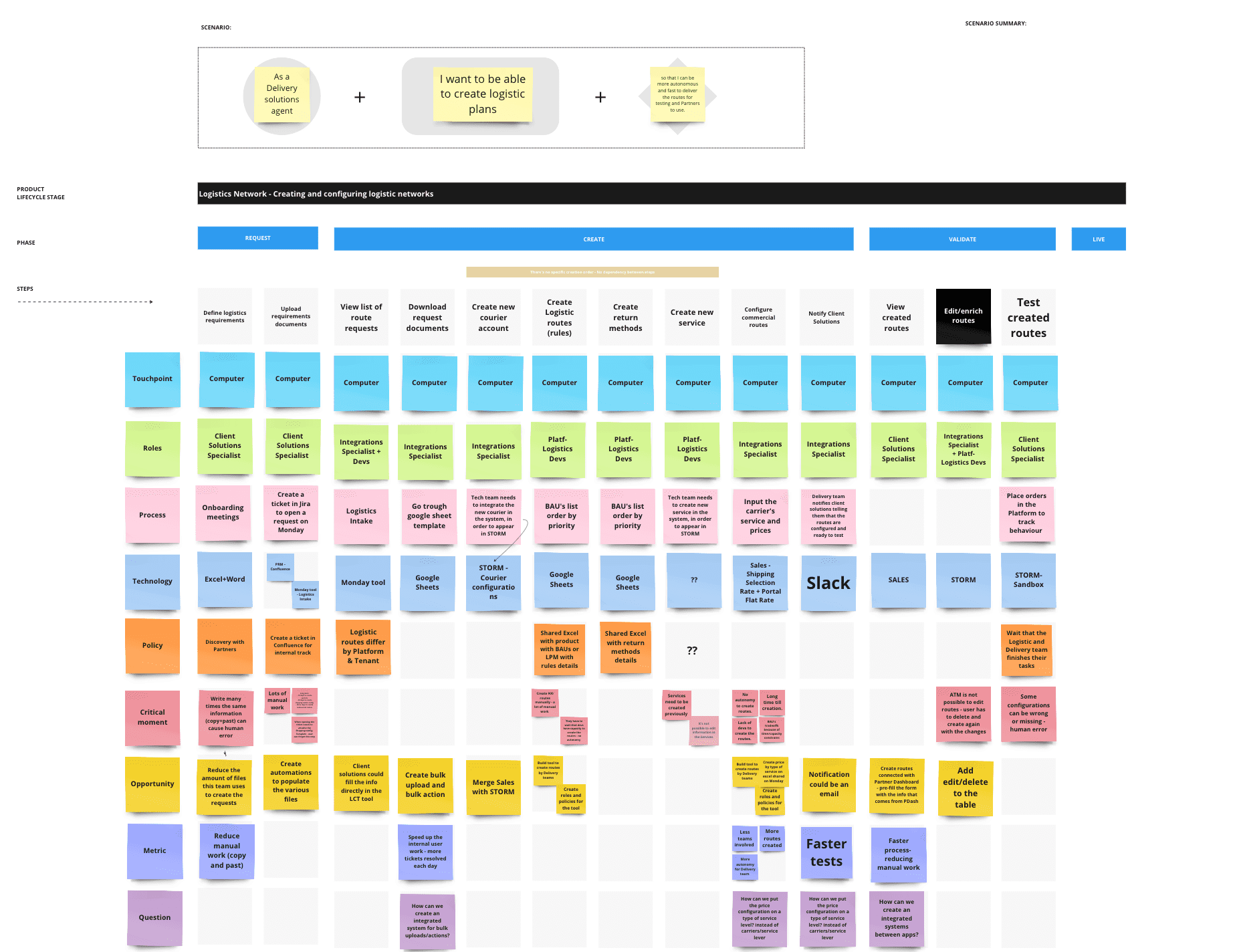
After analysing the research findings I decided to use a Service Blueprint to map out the current flow.
This exercise allowed me to collect questions, critical moments and ideas. Pull out actionable insights that enabled me to plan longer-term holistic improvements and create an action plan to follow afterward.
When finished, I convened the project manager and stakeholders to present the final result and iterate based on their insights.
The main pain ponts identified were:
- Use of many diferent documents and Excel to create routes
- Use of legacy tools with bad user experience and poor features
- Poor comunication between systems and teams
- Loss of sales due to the significant amount of time it takes to create logistic plans.
Network Service Blueprint
Ideation
👩🏻💻 How might we create an efficient tool that allows the users to be autonomous when creating logistic plans?
Considering the use cases and the data from the research phase, I realized that we needed two different tools instead of just one to create logistic plans: Network & Planner. I reached this conclusion because the configurations were significantly different and managed by separate teams, making it impractical to consolidate them into a single tool.
- Network (focus of this use case) with the goal of creating trade lanes and Planner to create strategic plannings.
I used the data to pitch this idea to the business and change the scope of the initiative. When they presented the business case to me, they were convinced that a single tool for all configurations was sufficient but my research showed the oposite.
Then, I initiated the ideation phase by generating various artifacts.
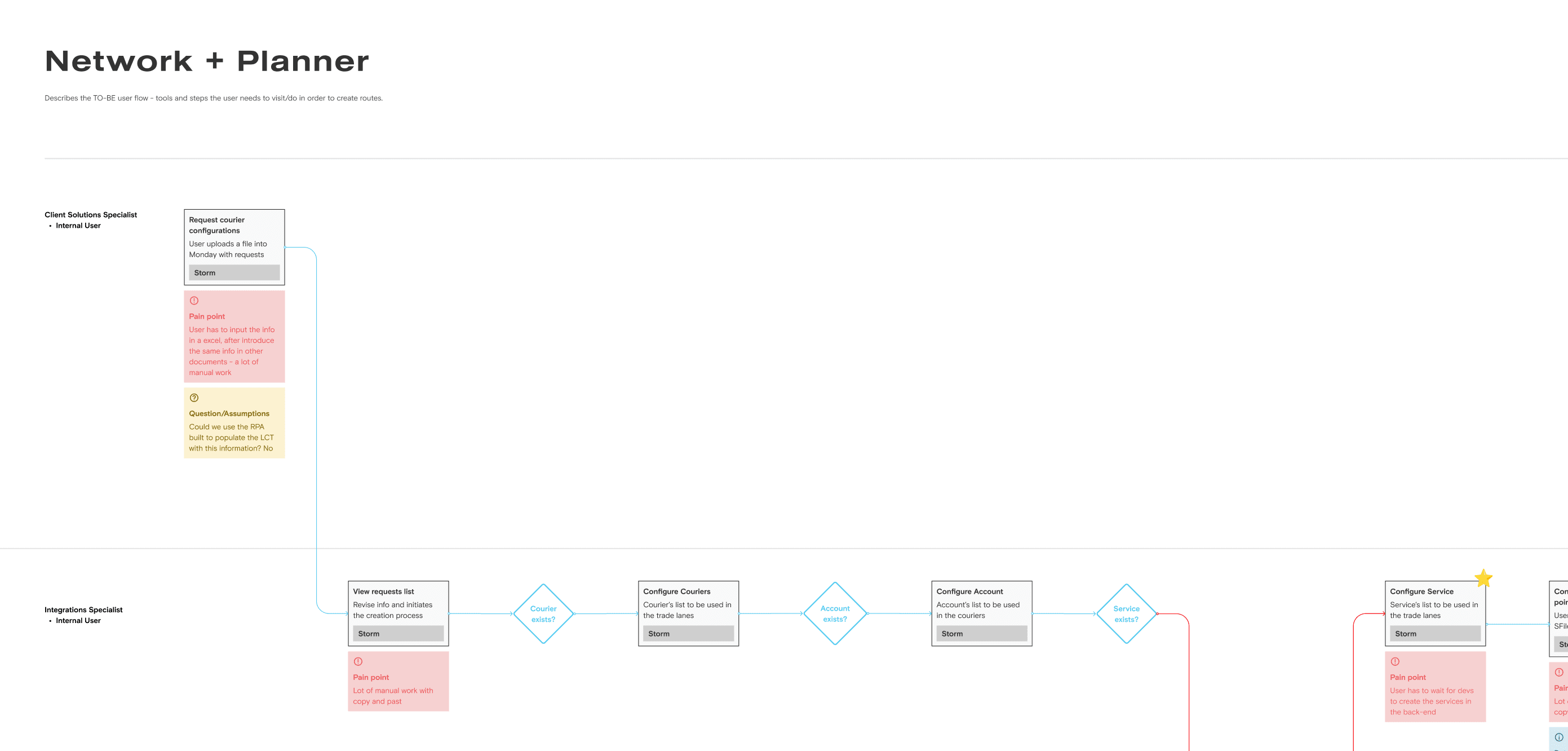
🚶 User Flows: I maped the user flow for this tool and shared with the PMs and developers. I like to involve them in the process as early as possible to ensure that less problems will come up and to evaluate technical limitations that we might have.
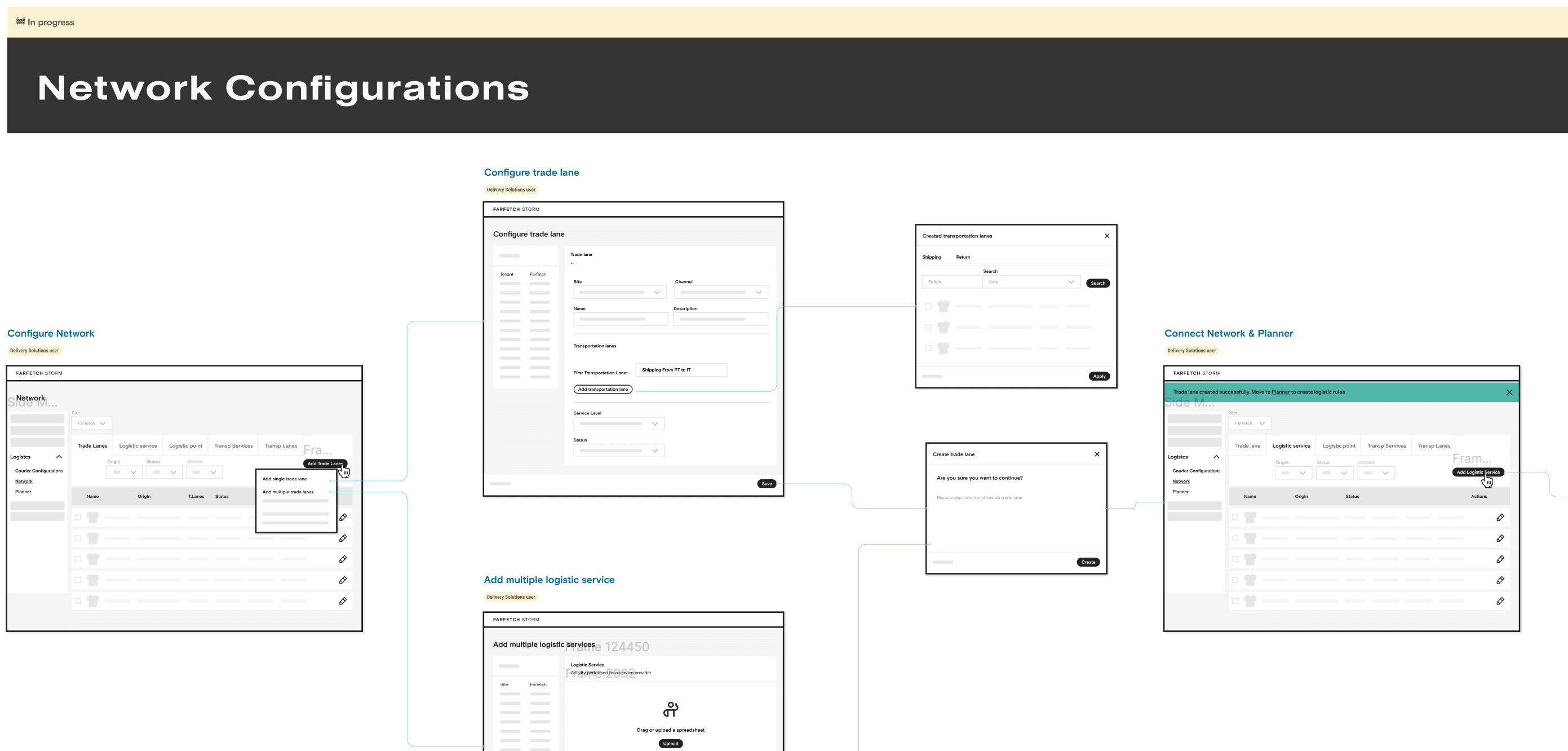
✏️ Wireframes: Once the flows were complete and shared with the cross-functional team, I started to create low-fidelity wireframes. I used wireframes as a communication tool, bringing clarity to the team. We did several rounds of iterations untill we had something concise.
Network user flow
Network wireframes
Validation
Mockups
After the first phase of ideation I proceeded to the next step in which I designed mockups and created a prototype to test with the users.
During this process I organized meetings every week with my cross-functional team to involve them in the process and gather their opinions.
When the prototype was ready, we tested with the users and iterated based on the results - a script was written and tasks (based on real use cases) were given to the users.
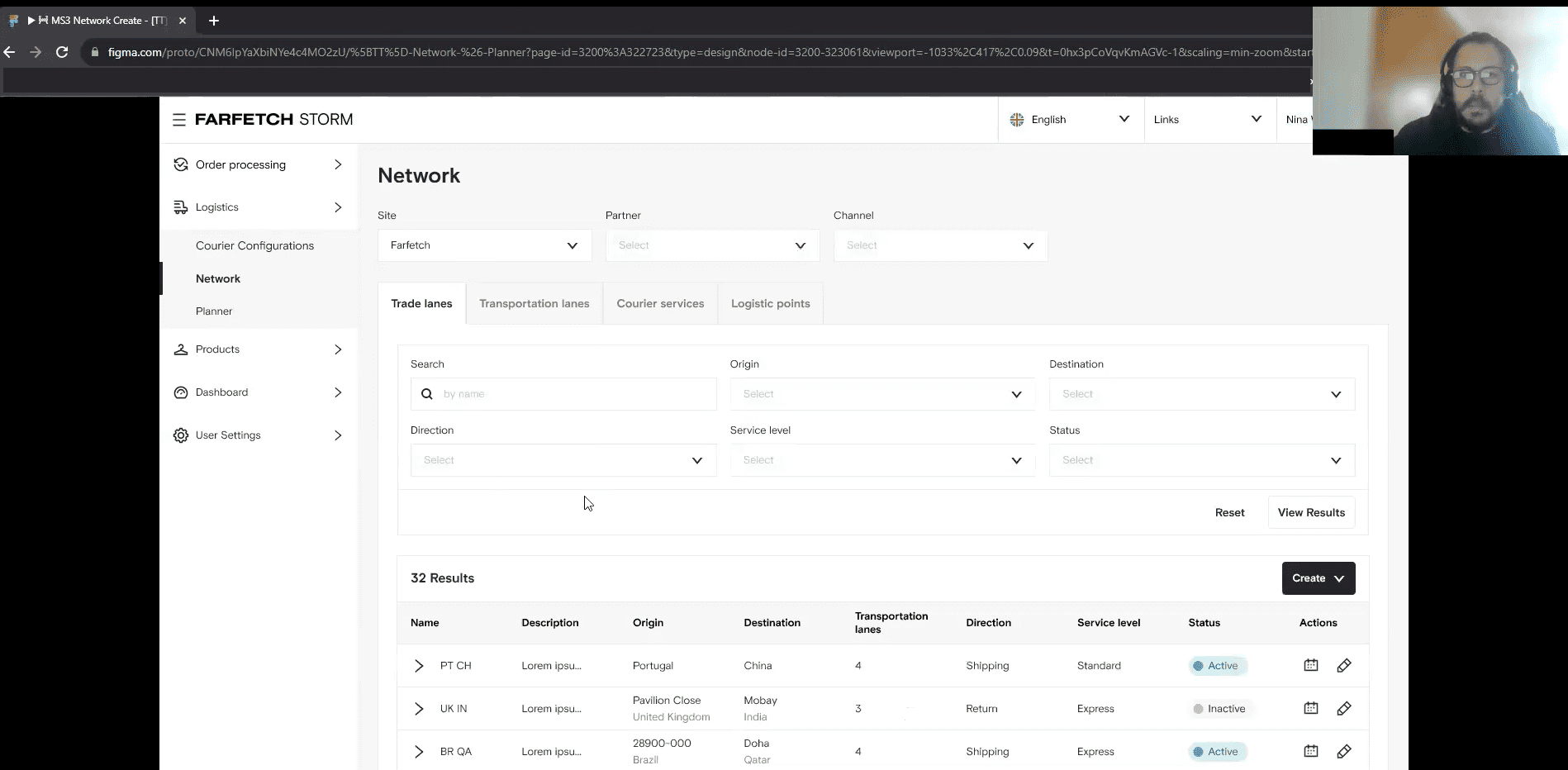
"Create and apply transportation lanes when creating trade lanes is a must and a mindblowing experience." 😍
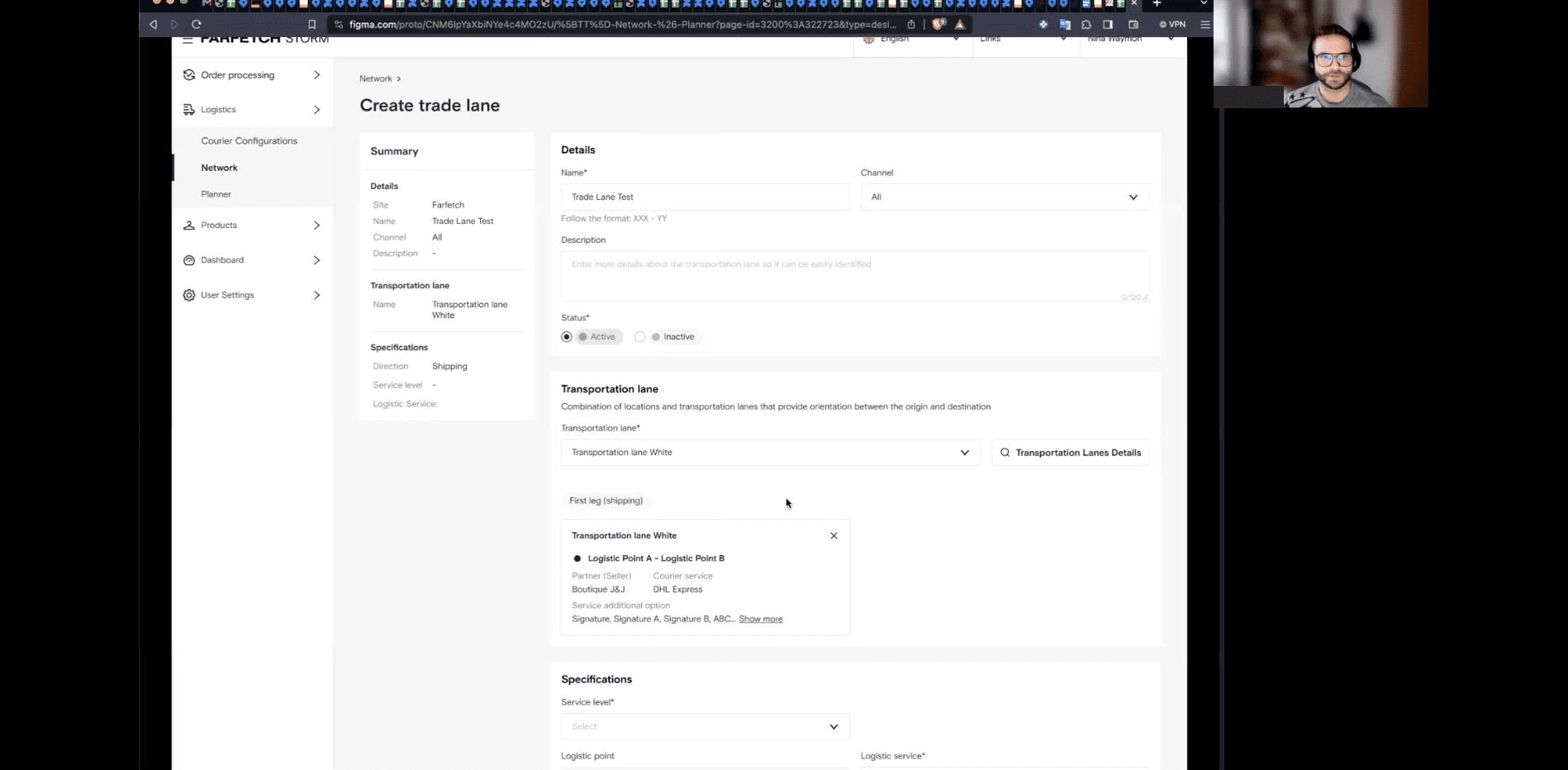
"It's a very good experience and covers all the use cases expected...I hope one day AI can do all of this" 🔥
The user testing was very positive and the users were very glad with the results. They performed the tasks with ease and rated the interface 5 out of 5 in user experience and user interface.
Their main concern was about the performance of this new tool, because legacy tools are very poor and time consuming.
After the tests, small tweaks were made to the interface like adding tooltips to the new terminology introduced and indicate the origin and destination in the trade lanes on the listing page.
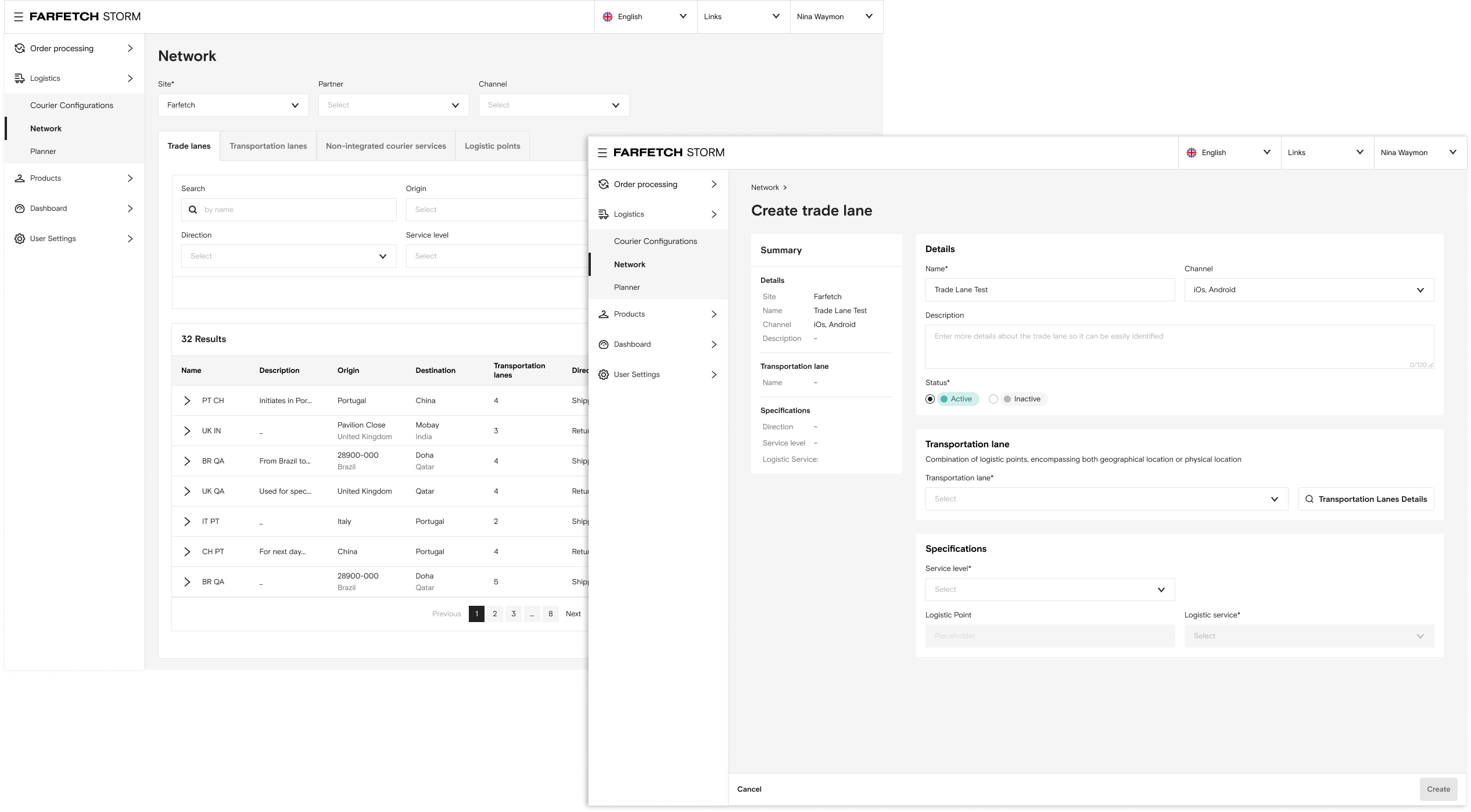
*Only some screens of the journey are being displayed on the right hand side.
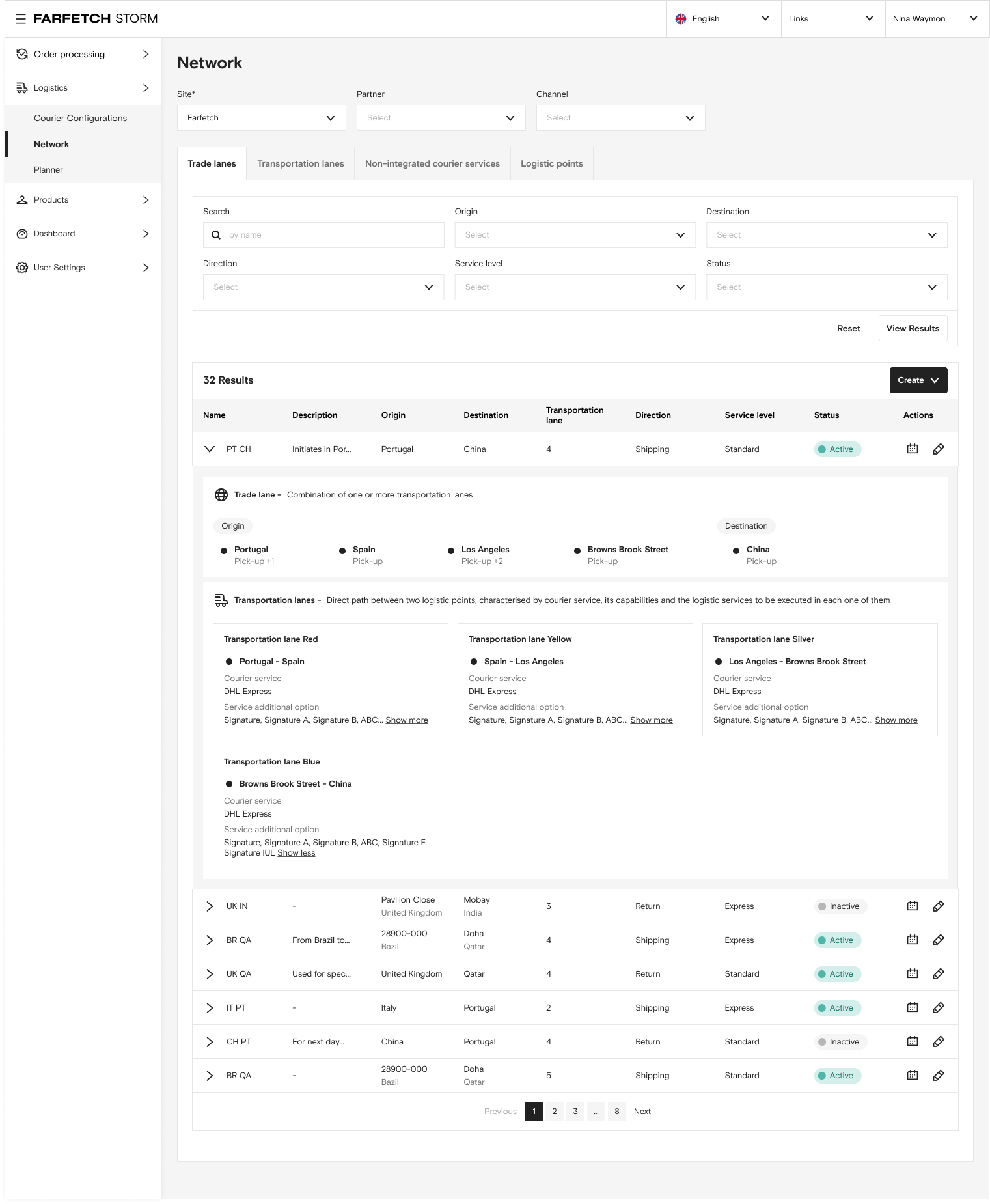
Network Listing Page - Here the user can find 4 listing pages. In the trade lanes the user can use the filters to find specific trade lanes, can create in single or bulk, can see more details of the trade lane through the expandable row. Can check the history log and also edit the details.
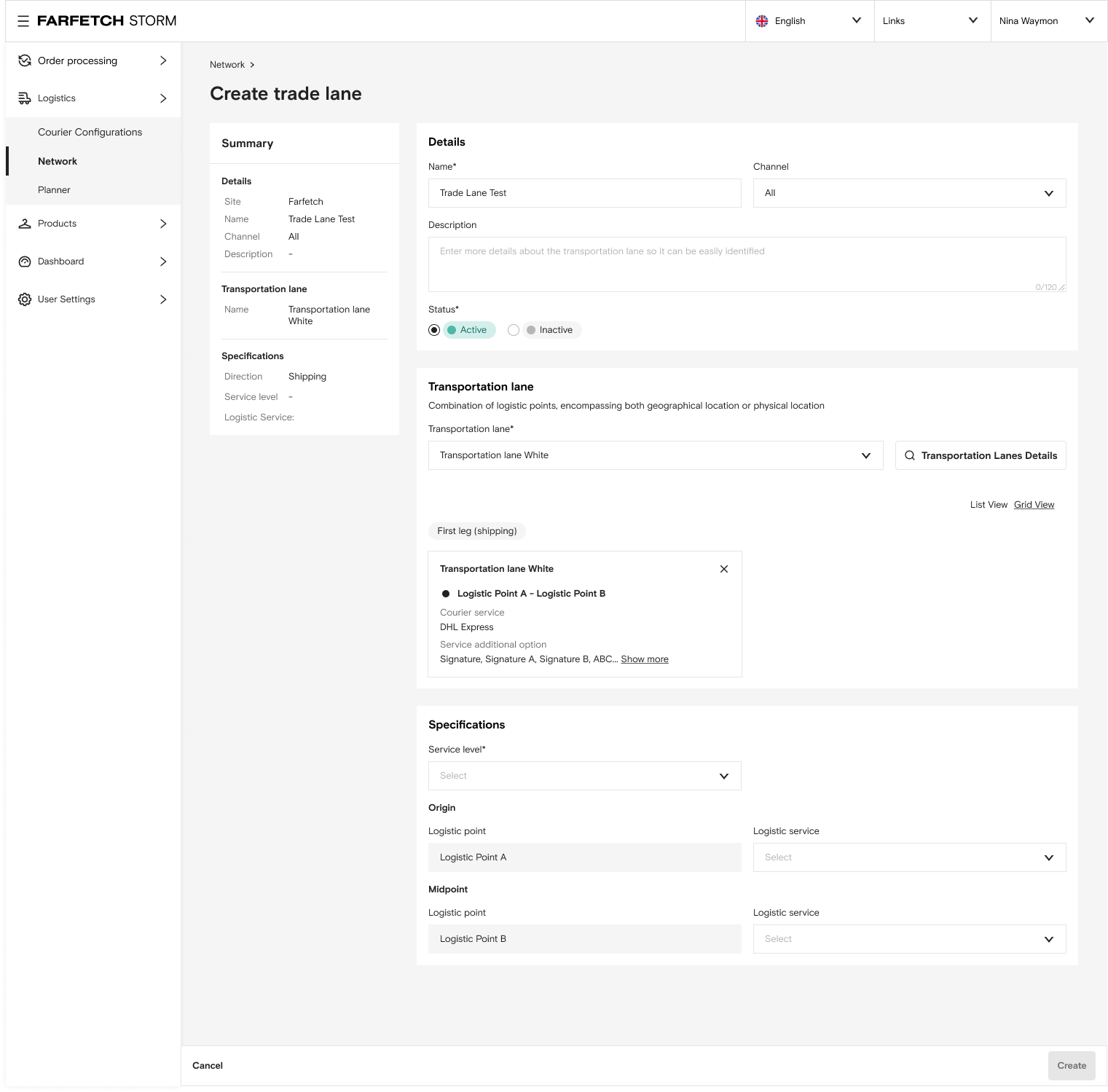
Single create - In this page the user can create a new trade lane completing the details section, adding transportation lanes and the trade lane specifications. On the left there's always a summary card that is filled in real time with the form information so the user can keep track of all the configurations.
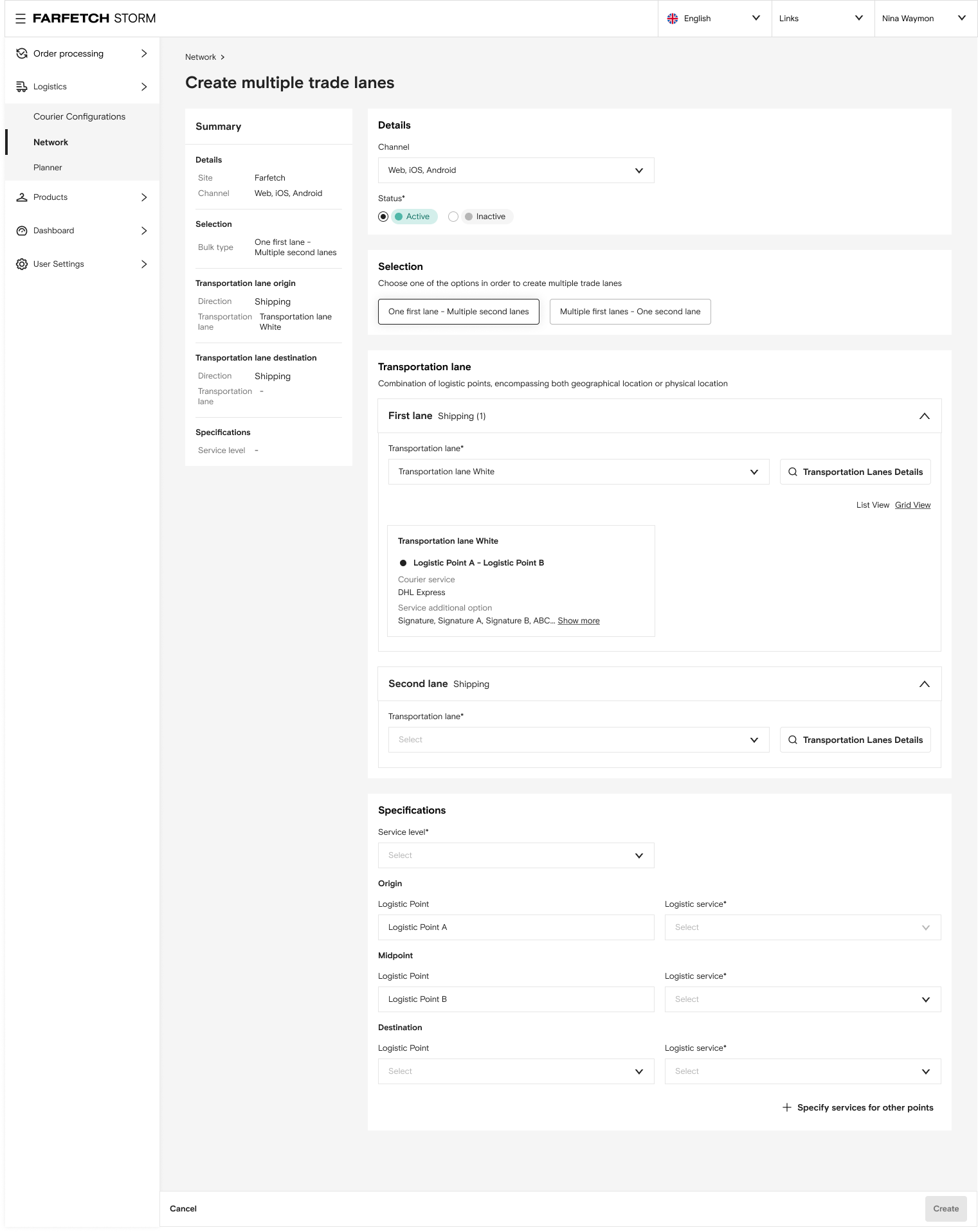
Bulk create - In this type of creation the user has to choose between two options: one to many or many to one and from there select the transportation lanes. This flow was quite challenging due to its validations but a very important one because it will give the user the ability to create multiple trade lanes in one go.
Expected Results
💨 Logistic plans will go live faster
Network is currently being implemented by the development team but when released, this tool will empower the teams to make informed decisions and create logistic plans. With better logistics management, we can ensure on-time and efficient deliveries.
- Shorter SLA's
- Less tickets generated
- Expected to reduce the time to create logistic plans from 30 days to only 7 days
- Reduce manual work and duplicate documents
- Kill legacy tools
- Reduce the teams needed from 3 to 2
In the Network the users will be able to create:
👉 Trade Lanes in single and bulk: also known as routes, that are the combination of one or more transportation lanes.
👉 Transportation lanes in single and bulk: direct path between two logistic points.
👉 Non-integrated courier services: services provided by the couriers (created outside the FF platform) like DHL Standard or Fedex Express.
👉 Logistic points: Locations that can be physical location or geographical location.
The tool was designed using the Farfetch Platform B2B design system, following the patterns and UX copy rules established.
Challenges
👩💻 Team lacked experience in working with design
Logistics was a vertical that never had tooling, so my peers (devs and PMs) were not used to work with designers - I had to advocate for the users and their needs, help the team to change their mindset and demonstrate that design brings a lot value to the business.
The balance was very positive and after the first weeks everyone was engaging with the processes that I've implemented and were very happy to work alongside with design.
📓 Poor and very technical documentation
The documentation provided to me was very technical and hard to read. The business case was a bit confusing and there weren’t clear requirements - so I had to work with the PMs to fill these gaps and create proper documentation.
I took advantage of this issue to implement the templates and processes that I've created in my documentation side project during my first year at Farfetch.
Future Improvements
This project is still in the development phase, but as planned, when it goes live, I would like to implement Omnitracking to measure whether the established success metrics are met.
Additionally, analyze the Omnitracking results to inform future iterations and make tool improvements based on user behaviors, always aligning with the business goals.
NEXT PROJETC
|